AutoFill - Enrollment Window Overview
The AutoFill - Enrollment window is visible when you are enrolling patients into AutoFill.
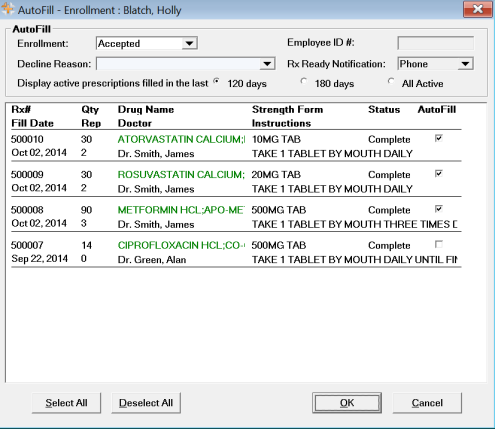
Review the table below for descriptions of each component within the AutoFill - Enrollment window.
Table: AutoFill - Enrollment Window
| Field | Description |
| Enrollment (dropdown) | Indicates whether the patient has Accepted or Declined enrollment in the program. |
| Employee ID # | Optional depending on Pharmacy Preferences. Specify employee number to identify the user who activated enrollment for the patient. |
| Decline Reason (dropdown) | If patient declines enrollment into AutoFill, a list of decline reasons are available to select. |
| Display active prescriptions filled in the last |
You can select one of the following options:
|
| Patient's Profile Panel | Displays active prescriptions in a patient's profile based on the preferences selected. |